Video ads are no longer limited by cameras, crews, or production timelines. With tools like Veo 3, marketers can now generate realistic video scenes from a simple text prompt in minutes. What used to take weeks can now happen in an afternoon. This shift mirrors a bigger change in how AI ads are reshaping creative workflows across marketing teams.
But speed alone doesn’t equal results.
This review looks at Veo 3 specifically through a marketer’s lens: what it is, where it shines, where it falls short, and how teams can actually turn AI-generated video into ads that perform at scale.
What Is Veo 3?
Veo 3 is Google’s latest text-to-video model built for generating short, high-quality video clips from a written prompt. You describe the scene you want (setting, subject, mood, camera angle, movement, lighting), and it produces an 8-second video that looks more like real footage than the older, obviously AI-style clips.
What makes Veo 3 especially relevant for marketers is that it is designed to follow production-style direction in the prompt, so you can specify things like:
Style: cinematic, commercial, documentary, playful, etc.
Camera language: fixed wide, dolly/tracking, macro close-ups, top-down shots
Brand vibe cues: calm, premium, cozy, energetic, whimsical
Audio (in many demos/workflows): ambient sound, music bed, dialogue-style timing
Here's an example of an ad created using Veo 3:

Veo 3 isn’t “one button = finished ad.” It’s a shot generator that can create B-roll, stylized scenes, product ads, or concept visuals quickly, which you can then assemble into marketing assets the same way you would do with real footage.
What is Veo 3 Good at
Veo 3’s biggest strength is simple: the videos look real. They are not stylized animation-real, but footage that often passes as professionally shot content at a glance. Lighting behaves naturally, motion feels grounded, and objects interact with believable physics. For marketers, this matters because realism directly affects trust and scroll-stopping ability.
This is especially valuable in paid social and short-form ads, where audiences make snap judgments in the first one or two seconds. Veo 3 can produce scenes that feel native to feeds instead of standing out as synthetic or overproduced.
Beyond advertising, Veo 3 is also versatile in how it’s applied. Marketing teams are using it for cinematic brand storytelling and short-form ads, but it extends well into adjacent use cases:
Education: visual explanations for complex ideas, product walkthroughs, or onboarding content
Internal enablement: employee training videos, process explainers, and scenario-based learning
Sales support: lightweight demo visuals or concept videos for pitches and decks
In all of these cases, the value isn’t just speed. It’s the ability to create immersive, visual content without specialist production resources. That makes Veo 3 a flexible tool that fits into multiple parts of a business, not just the marketing team.
For organizations trying to scale video usage across functions, this combination of accessibility and versatility is a meaningful advantage.
Speed That Enables Creative Exploration
A major advantage of Veo 3 is how quickly teams can move from idea to visual. It lowers the cost of trying ideas.
That changes creative behavior. Instead of debating concepts in theory, marketers can:
Generate visuals for multiple directions
Compare tone, mood, and composition
Decide what’s worth scaling further
Teams often generate multiple visual directions, compare them against existing ad examples, and only scale what clearly stands out.
This is especially helpful in early campaign development, when teams want to explore options before locking in a direction. Veo 3 makes experimentation cheaper in time and coordination, even before factoring in production costs.
User-Friendly and Versatile
With Veo 3, you don’t need video production experience, motion design skills, or complex tooling to get usable output. If you can describe a scene clearly in natural language, you can generate a video. That lowers the barrier for marketing teams where video creation is no longer handled by specialists alone.
It also supports multiple languages, including Spanish, Mandarin, Swedish, Hindi, Afrikaans, Finnish, Danish, Dutch, French, and Japanese. This makes it easier for global teams to work in their native language rather than translating creative intent into English first.
From a workflow perspective, Veo 3 benefits from tight integration with Google’s ecosystem. Tools like Flow (AI filmmaking tool) sit on top of Veo and give marketers a more visual, guided way to generate and manage clips, rather than treating video generation like a raw developer tool. This makes it easier to move from prompt to usable asset without jumping across platforms or exporting files repeatedly.
Integrated Audio and Synchronization
One of its standout features is native audio generation, creating dialogue, sound effects, ambience, and background music in a single pass alongside the visuals. This eliminates the need for separate editing and results in realistic lip-syncing for characters.
This helps with narrative ads or demos where spoken lines need to match on-screen action. It also fastens your speed during iteration, since you’re not layering placeholder audio just to evaluate a clip.
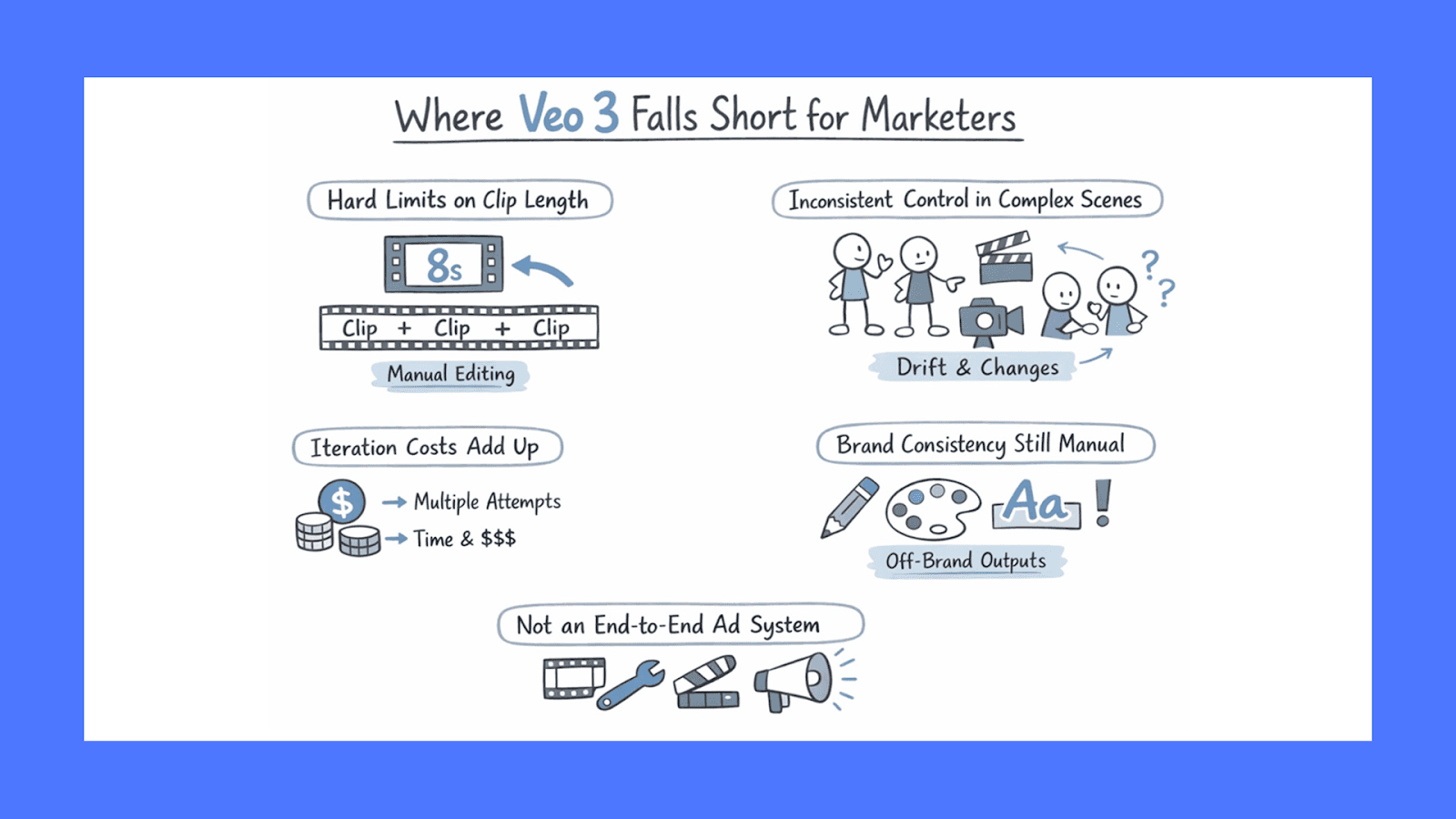
Where Veo 3 Falls Short for Marketers
Veo 3 is impressive, but it’s not a frictionless solution for marketing teams. Most of its limitations show up after the initial “wow” moment, when you try to use it consistently, at scale, and under real campaign constraints.
Hard Limits on Clip Length
Every Veo 3 generation is capped at roughly 8 seconds. For marketers, that means anything longer requires stitching multiple clips together. This adds overhead around continuity, pacing, transitions, and audio consistency. What starts as a fast generation step quickly turns into a manual assembly problem.
Inconsistent Control in Complex Scenes
Veo 3 performs best with simple, single-focus scenes. As soon as you introduce multiple characters or coordinated actions across a scene, the results become less predictable. Camera angles can drift, objects may shift position, and character details can subtly change between generations. This forces extra iterations, which eat into both time and budget.
Iteration Cost Adds Up Quickly
While generating one clip is fast, getting the right clip often takes multiple attempts. Small adjustments to tone, motion, or framing usually require a full re-render. For teams using API pricing, this compounds costs quickly. Even on subscriptions, iteration becomes the real constraint, not generation speed.
Brand Consistency Is Still Manual
Veo 3 doesn’t understand brand systems out of the box. Colors, typography, logo placement, pacing norms, and visual tone still need to be enforced downstream. Without guardrails, outputs can drift off-brand across variations, which creates review friction and slows approvals.
Not an End-to-End Ad System
Most importantly, Veo 3 does not handle editing, versioning, testing, or scaling ads. It generates clips, not campaigns. For marketers running paid media at volume, that gap becomes obvious very quickly.
Veo 3 is a strong generation tool from Google, but turning its output into reliable, repeatable ad performance still requires additional systems, workflows, and creative infrastructure.
Veo 3 Pricing: What Marketers Should Actually Budget For
Veo 3 pricing depends on how often you generate videos, how polished they need to be, and how many iterations you expect per asset. The key is choosing the access model that matches usage patterns, not just the lowest headline price.
Here is a breakdown of how Veo 3 is priced today and what that means for your budget:
Subscription Pricing
Google bundles Veo access inside its AI subscriptions. This is the most predictable option for teams producing videos regularly.
Google AI Pro costs $28.99/month. You get:
Access to Veo 3.1 Fast (the faster, lighter version)
Limited daily generations via Gemini
Watermarked videos
It's best for solo marketers, creators, or teams experimenting with AI video for social content and internal testing.
Google AI Ultra costs $359.99/month. You get full access to Veo 3 / Veo 3.1 (highest quality). It's best for agencies, in-house performance teams, and brands producing video ads at scale. You don't have to go through Google directly to use Veo 3.
Several third-party platforms license the same model and wrap it in their own pricing and creative tools, often at a significant discount. Here are some of the options:
Freepik integrates Veo 3 alongside other video models like Kling, Runway, and Pika, all accessible through a single subscription starting at $5.75/month (annual). You can experiment across models using the same credit pool, which is useful if you want to compare output quality across engines.
Higgsfield takes a multi-model aggregation approach, bundling 15+ AI models (including Veo 3.1, Sora 2, and Kling 2.6) under one subscription starting at $75/month. It adds professional controls like camera simulation, character consistency, lip-sync, and multi-shot mode that aren't available through Google's native tools. For teams producing at volume, Higgsfield's bulk API pricing means you get significantly more generations per dollar than going direct.
Envato is one of the most affordable entry points. If you already subscribe for their royalty-free asset library (starting at $16.50/month on an annual plan), Veo 3 access through their VideoGen tool comes at no extra cost. It includes a lifetime commercial license on all generated content, making it a solid option for teams that want to test AI video alongside an existing stock footage workflow.
Use Airpost to Create Winning Ads
Veo 3 is solid for generating quick scenes and B-roll, but the output usually isn’t “ready to launch.” You still end up spending time on selection, trimming, sequencing, captions, hooks, resizing for placements, and keeping everything on-brand. When you’re trying to ship a lot of creative every week, that editing and QA layer becomes the bottleneck.
That’s where Airpost can help.
Airpost combines AI with experienced creative strategists who manage inputs, structure, and iteration for you. You plug in your brand assets and a living brief, and Airpost keeps generating fresh concepts, variations, and ready-to-test creatives. As winning patterns emerge, new variations are created automatically.
Book a demo to see how Airpost helps you ship winning ads faster.



