Dec 15, 2025
What are AI ads, and How are They Made in 2026
Case Study
•
John Gargiulo
What are AI ads, and How are They Made in 2026
If you’ve wondered why every brand suddenly has endless variations of the same ad, here’s the secret: they’re not making them manually anymore. They’re using AI to generate scripts, footage, and edits at a pace no creative team can match.
In this blog, we'll show you what AI ads are, how you can create them, and what their limitations are.
What Are AI Ads?
AI ads are ads created with the help of artificial intelligence across different parts of the production workflow. Instead of relying only on writers, editors, and designers, brands use AI tools to generate scripts, pull together visuals, create rough cuts, and produce variations at scale.
An AI ad doesn’t need to look “AI-made.”
Most are built from a mix of real product footage, brand assets, and AI-generated elements like voiceovers, motion, transitions, or added scenes. The goal isn’t to replace the creative process but to speed it up and make it easier to test more ideas.
AI ads usually include at least one of these:
Script or angle generated by an AI model
Video assembled or edited by an AI editor
AI-generated scenes or product shots
Auto-generated variations for A/B testing
Captions, hooks, and CTAs produced through AI systems
A good early example is Heinz A.I. Ketchup. The brand used DALL·E 2 to generate images based on prompts like “ketchup scuba diving” and “ketchup in outer space.” The results consistently resembled Heinz bottles, so the company turned those AI outputs into print ads.
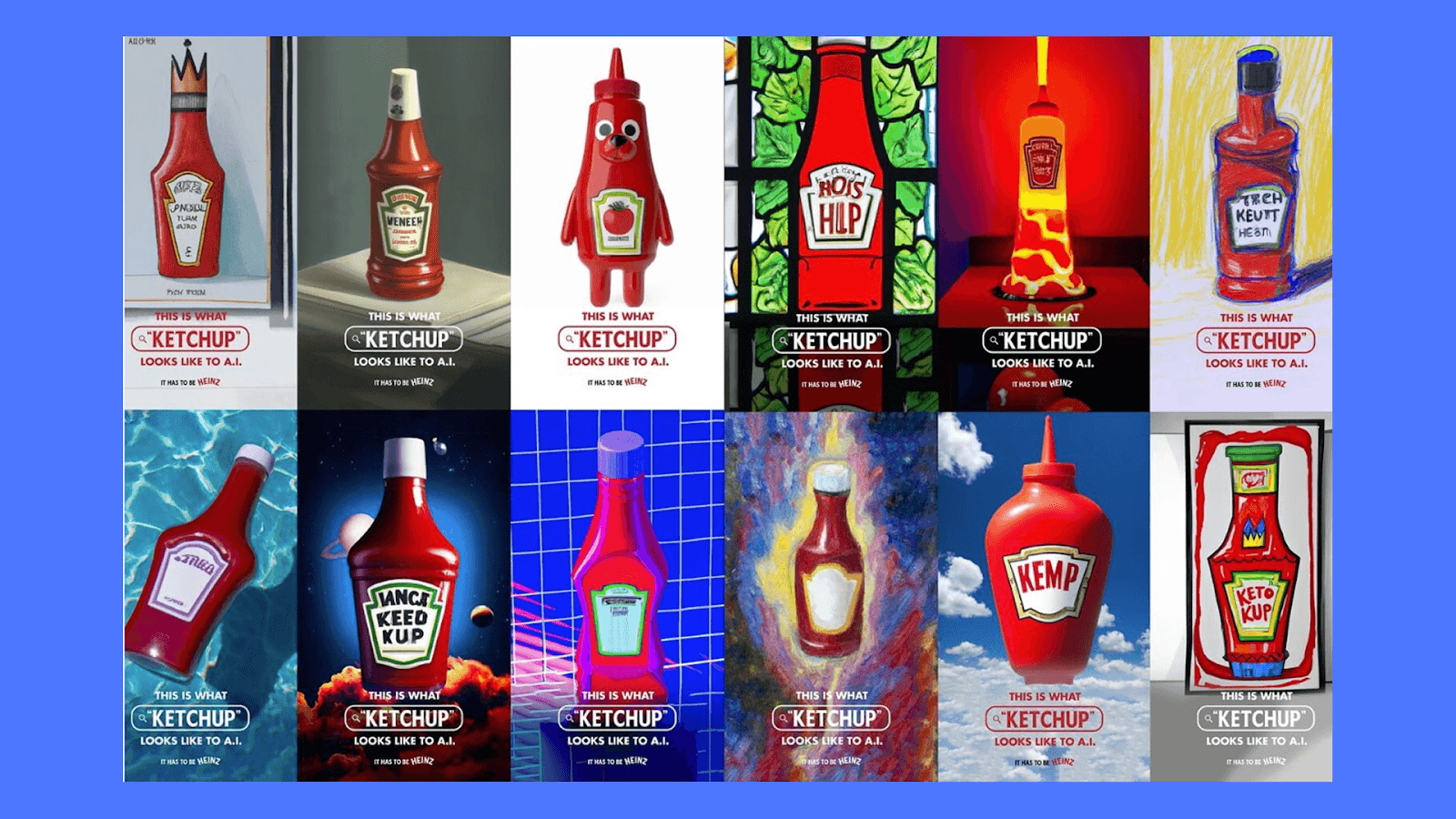
Think of AI ads as a new production method. You still decide the idea, the tone, and the direction. AI helps you turn those decisions into dozens of ready-to-test creatives at a pace a traditional team can’t match.
How AI Ads Are Made
Even though every brand uses different tools, the overall process of making AI ads is surprisingly similar. You set the direction, give the AI the right materials, and then refine what it produces.
Start with a focused brief
A good AI brief answers three things:
Who is this ad for
What is the value prop
What angle are we trying
That’s enough direction for the AI to produce something meaningful without wandering off.
Add your product assets
This is the part people underestimate. AI does better when it has real material to work with — product photos, past ads, testimonials, unboxing clips, even screenshots.
Strong inputs = fewer unusable drafts.
Good inputs include:
High-resolution product photos
Clean UGC clips or customer videos
Screenshots of features or benefits
Past winning ads (so the AI learns pacing + tone)
Your brand kit: colors, fonts, logo, voice notes
Real customer reviews or quotes
A simple, testable angle
Let the AI draft the structure
Most tools will generate a script or a loose outline. It’s not the final copy. It’s the equivalent of a junior creative handing you a bunch of ideas you can react to. Pick what feels closest.
Generate the first cut
This is where things start to look like an ad. The AI stitches your assets together, fills gaps with AI scenes, adds captions, and sets pacing.
What usually gets auto-handled:
Transitions and scene order
On-screen text
Captions timed to the script
Intro frames or visual hooks
Light background music
For example, if you upload three product shots and a UGC clip, the AI might create a 15-second demo with an AI-written hook, a product callout, and smooth transitions that match the beat.
Refine what you got
Human judgment steps in here. You fix small visual issues, adjust tone, swap out scenes, and make sure the ad feels like your brand and not just a template.
This is usually the difference between “AI-made” and “market-ready.”
Here's an example of a ‘market-ready’ ad made with AI launched by Volvo:
Volvo - For Life // AI generated spec commercial
Spin out variations
Once the main version works, AI can generate dozens of variations quickly. This is the part teams love because it removes the repetitive work.
Variations you can generate:
New hooks and intros
Shorter or longer edits (6s, 10s, 15s, 30s)
Different CTAs (“Shop now,” “Learn more,” “See how it works”)
Platform-specific formats (Reels, TikTok, Shorts, 1:1 feeds)
Alternate pacing styles (fast-cut vs steady)
Caption-only or silent-friendly versions
This makes testing easier and helps you keep ads fresh without rebuilding everything from scratch.
In most teams, this blend of AI speed and human refinement is what gets ads over the finish line. It doesn’t matter whether you use a self-serve tool, a hybrid model, or a managed platform — the pattern stays the same.
Types of AI Ads You Can Make
AI tools can create several ad formats depending on the assets you upload and the angle you want to test. One common type is the product explainer, where AI adds motion, captions, and simple transitions to show what the product does.
You can also make UGC-style ads. These combine your footage (or customer clips) with AI-generated hooks, voiceovers, or filler scenes to create a social-first look without a full shoot.
Other formats include:
Comparison ads
Before-and-after sequences
Short tutorials
Photo-to-video demos
These options give you a wide range of concepts to test without rebuilding every ad from scratch.
Limitations of Making Ads With AI
AI makes production faster, but it still has clear limits.
1. AI can’t make creative decisions
AI tools generate options, not direction. They can write scripts or assemble edits, but they can’t decide which angle fits your audience or which concept reflects your brand.
2. Visual accuracy is still hit-or-miss
Hands, product labels, textures, and proportions can look slightly off in AI-generated scenes. These issues often appear once the ad is in motion, not in the preview.
3. Brand consistency needs human oversight
AI outputs tend to feel generic at first. Without a person refining the tone, pacing, and message, the final ad can drift away from the brand.
4. AI doesn’t understand context
It can’t grasp business goals, compliance requirements, or the claims your product can legally make. It needs clear direction and constraints to produce usable work.
5. Not every output is usable
Even with strong prompts and good assets, AI produces misses. Some scenes won’t match the product, some edits won’t feel right, and some concepts won’t be performance-ready.
How to QA an AI Ad Before Publishing
AI can generate drafts quickly, but the final filter still needs to be human. A short QA pass catches most issues before they become wasted spend in an ad account. Here’s the quick workflow most teams use.
Visual checks:
Look closely at the product and its surroundings.
Does the product look real?
Any distorted hands, labels, or edges?
Any weird lighting or shadows?
Small visual flaws are the easiest way for an ad to feel off, even if the script is strong.
Copy checks:
Make sure the words match the angle you set.
Does the hook match the angle?
Does the AI add claims you can’t legally make?
Is the tone consistent with your brand?
AI tends to overpromise, so this step protects both performance and compliance.
Pacing checks:
Strong pacing often decides whether someone watches past the first second.
First three seconds strong?
Any awkward pauses?
Does the ending land?
Most AI cuts need a little tightening here.
Platform checks:
Each platform rewards different rhythms and formats.
TikTok-friendly pacing?
Reels-friendly formatting?
YouTube Shorts aspect and duration?
A good ad can underperform if the format isn’t tuned to the channel.
Most mistakes show up during QA, not generation. A quick pass often turns a “maybe” ad into one worth testing.
How Airpost Helps You Make AI Ads That Actually Perform
Most AI tools stop at generation. They give you a few variations, a handful of templates, and then it’s on you to figure out what works. Airpost is built for the part that comes after — the part where results matter.
Airpost combines an AI engine with real creative strategists.
You upload your brand kit, product assets, and living brief. From there, the system creates new ad concepts every week, tests different angles, and updates your assets whenever you change the brief.
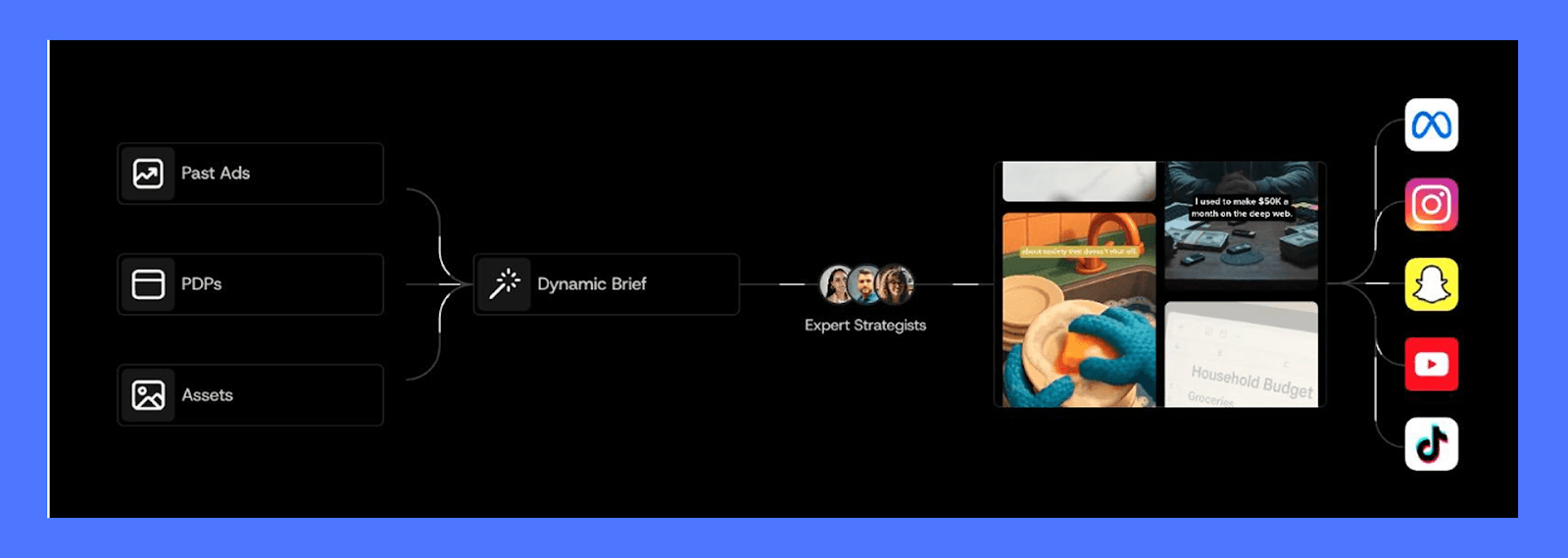
Check out some real examples of Airpost ads here.
Airpost pulls from your existing files, generates new AI footage when needed, and uses performance data to decide what to make next.
Because of that, teams get 10–100+ ads a week, not a handful. And when something starts working, it automatically spins out fresh variations you can launch right away.
If you want to see how that looks in practice, book a demo here with one of the product experts.