Instagram, TikTok, and YouTube all accept video ads, but they don’t treat them the same way. Aspect ratios, duration limits, file sizes, and placement rules vary enough that one wrong export can lead to cropped visuals, muted audio, or failed approvals.
This post lays out the current video ad specs and requirements for each platform in one place, so you can build or adapt videos correctly the first time and avoid rework during upload.
Video Ad Specs and Requirements for Instagram
Below is a clean, structured Instagram section focused only on video ads, written for someone who wants specs fast, with just enough context to avoid mistakes. I’ve used bullets where scanning matters and short paragraphs where explanation helps.
Instagram Video Ad Specs and Requirements
Instagram supports video ads across multiple placements, including Feed, Reels, Stories, Explore, Profile Feed, and In-Stream. While these placements look different to users, they share a common set of technical constraints that affect how your video renders, crops, and gets approved.
At a base level, Instagram supports video aspect ratios from landscape (1.91:1) to full-screen vertical (9:16). For most advertisers, vertical formats perform best, but your export should always match the placement you’re targeting to avoid automatic cropping.
Instagram Reels Video Ads
Reels are Instagram’s highest-priority video placement and are designed to feel native to organic content. Ads appear in the Reels feed and should be built as full-screen vertical videos.
Aspect ratio: 9:16
Minimum resolution: 1080 × 1080
Maximum file size: 4GB
Video length: 0 seconds to 15 minutes
Recommended length: Under 30 seconds for performance
Formats: .mp4, .mov
Reels ads work best when they’re fast-paced, vertically framed, and structured to hook attention in the first few seconds.
Instagram Feed Video Ads
Feed video ads appear between organic posts as users scroll. These ads support the widest range of aspect ratios but still require careful formatting to avoid visual loss.
Recommended aspect ratio: 4:5
Supported ratios: 1.91:1 to 9:16
Minimum resolution: 1080 × 1080
Maximum file size: 4GB
Video length: 1 second to 60 minutes
Formats: .mp4, .mov, .gif
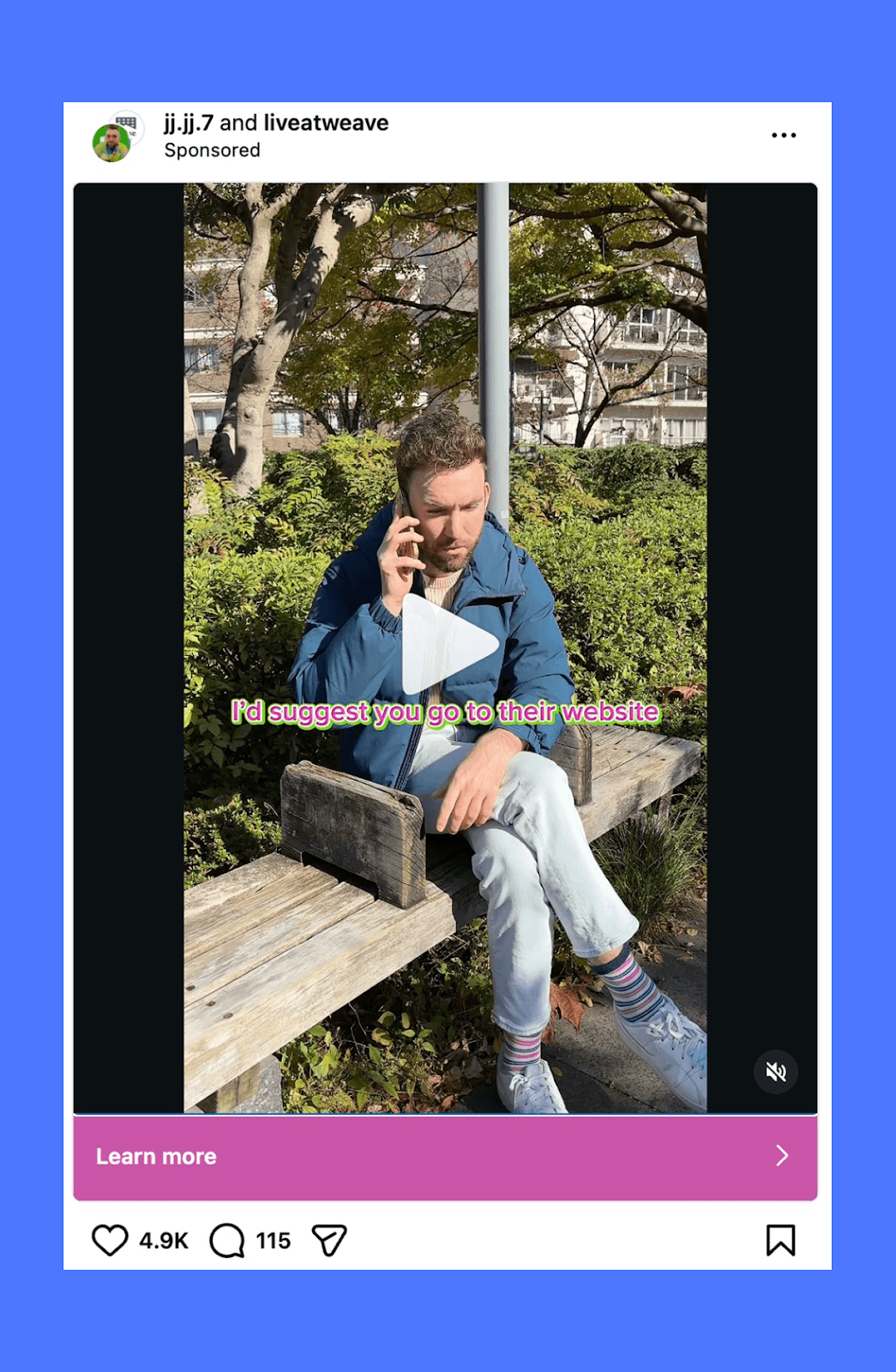
Only the first two lines of primary text are visible by default, so keep supporting copy tight. Captions and sound are optional but strongly recommended.
Instagram Stories Video Ads
Stories video ads are full-screen vertical videos that appear between user Stories. They’re skippable and rely heavily on immediate clarity.
Aspect ratio: 9:16
Minimum resolution: 1080 × 1080
Maximum file size: 4GB
Video length: 1 second to 120 seconds
Formats: .mp4, .mov, .gif
Instagram recommends leaving:
14% (≈250 px) clear at the top
20% (≈340 px) clear at the bottom
This prevents UI elements from covering key visuals or text.
Instagram Explore Video Ads
Explore ads appear alongside organic discovery content and should blend in visually rather than feel overly produced.
Recommended aspect ratio: 1:1
Minimum resolution: 1080 × 1080
Maximum file size: 4GB
Video length: 1 second to 60 minutes
Formats: .mp4, .mov, .gif
Primary text can be longer, but anything beyond ~125 characters may be truncated.
Instagram Profile Feed Video Ads
These ads appear when users scroll through a profile’s grid, inserted between organic posts.
Recommended aspect ratio: 4:5
Supported ratios: 1.91:1 to 9:16
Minimum resolution: 1080 × 1080
Maximum file size: 4GB
Video length: 1 second to 60 minutes
Formats: .mp4, .mov, .gif
Primary text is limited to 125 characters, with an optional headline up to 40 characters.
Instagram In-Stream Video Ads
In-stream video ads play between organic video content while users are actively watching.
Recommended aspect ratios: 1:1 or 4:5
Supported ratios: 1.91:1 to 9:16
Minimum resolution: 1080 × 1080
Maximum file size: 4GB
Video length: 1 to 60 seconds
Formats: .mp4, .mov, .gif
Captions, sound, and text overlays are optional but highly recommended to maintain clarity when videos autoplay without sound.
TikTok Video Ad Specs and Requirements
TikTok video ads are built for a mobile-first feed, so specs stay fairly consistent across ad types. What changes most is the placement you’re buying and how strict the duration rules are.
TikTok In-Feed Video Ads (Feed Ads)
This is the most common TikTok ad format. It appears in the For You feed and behaves like native content.
Core specs
Aspect ratios: 9:16 (recommended), 1:1, 16:9
Minimum resolution (by ratio):
9:16 → 540 × 960
1:1 → 640 × 640
16:9 → 960 × 540
Max file size: 500 MB
Recommended formats: MP4, MOV (TikTok also supports formats like MPEG, 3GP, AVI for ads)
Video length: 5–60 seconds (safe baseline for most ad placements)
Minimum bitrate: 516 kbps
Ad descriptions can be up to around 100 characters. The exact limit can vary based on the ad placement and account configuration. Keeping copy concise reduces the risk of truncation.
TikTok TopView Ads
TopView is a premium placement that shows early in a session and plays more like a high-impact takeover.
Aspect ratio: 9:16
Minimum resolution: 540 × 960
Max file size: 500 MB
Formats: MP4, MOV, MPEG, 3GP
Video length: 5–60 seconds
Minimum bitrate: 2,500 kbps
YouTube Video Ad Specs and Requirements
YouTube supports multiple video ad formats, but the technical foundation stays the same across campaigns. As long as your video meets the core resolution, aspect ratio, and file requirements, YouTube will automatically adapt it to different devices without stretching or cropping.
General Video Requirements (All YouTube Ad Formats)
These specs apply across skippable, non-skippable, in-feed, bumper, and vertical video ads.
Recommended resolution: 1920 × 1080 (horizontal), 1080 × 1920 (vertical), or 1080 × 1080 (square)
Minimum resolution: 1280 × 720 (HD). Standard definition is accepted but not recommended.
Aspect ratios supported: 16:9 (horizontal), 9:16 (vertical), 1:1 (square)
Maximum file size: 256 GB
Supported formats: MPG (MPEG-2 or MPEG-4), MP4, MOV, AVI, WMV, FLV, WebM, ProRes, HEVC (h265)
Audio-only files: Not supported
Video length limits vary by campaign and ad format, so those should be checked at the campaign level rather than treated as a universal rule.
YouTube Thumbnail Specs
Thumbnails are required for many YouTube ad formats and play a major role in click-through.
Recommended size: 1280 × 720 pixels
Minimum size: 1280 × 640 pixels
Aspect ratio: 16:9
Formats: JPG, PNG, or GIF
File size: Under 2 MB for video ads
Companion Banner Specs (Desktop Only)
Some YouTube campaigns support a companion banner alongside the video player on desktop.
Dimensions: 300 × 60 pixels
Formats: JPEG, PNG, or GIF
Maximum file size: 150 KB
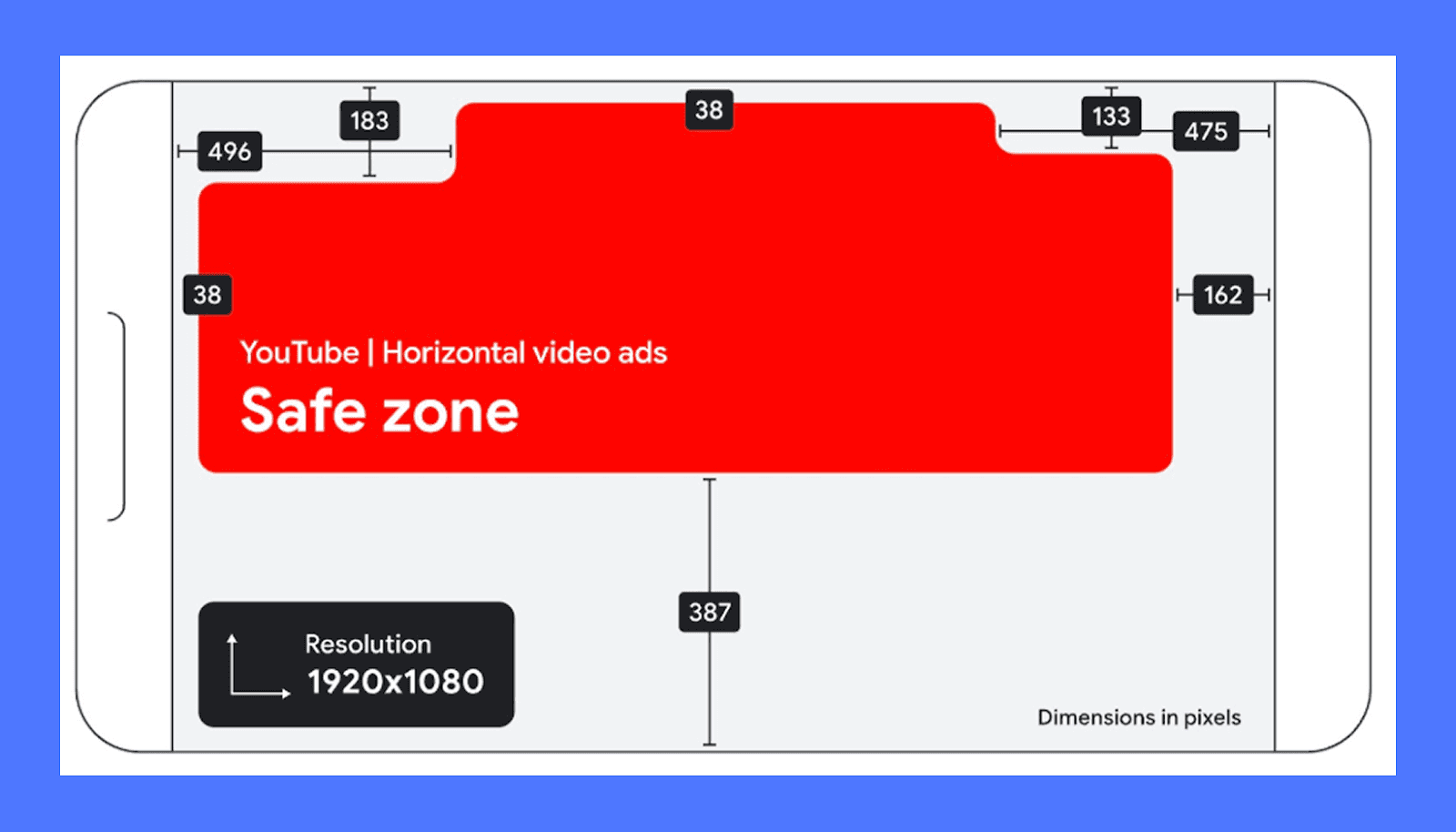
Safe Zones for YouTube Video Ads
YouTube overlays buttons, call-to-actions, and controls differently depending on device and ad format. To avoid logos, subtitles, or key visuals being covered, keep critical elements centered within a safe zone.
This applies to:
Horizontal videos viewed on TV, desktop, and mobile
Vertical videos viewed on mobile and tablet
Square videos across mixed placements
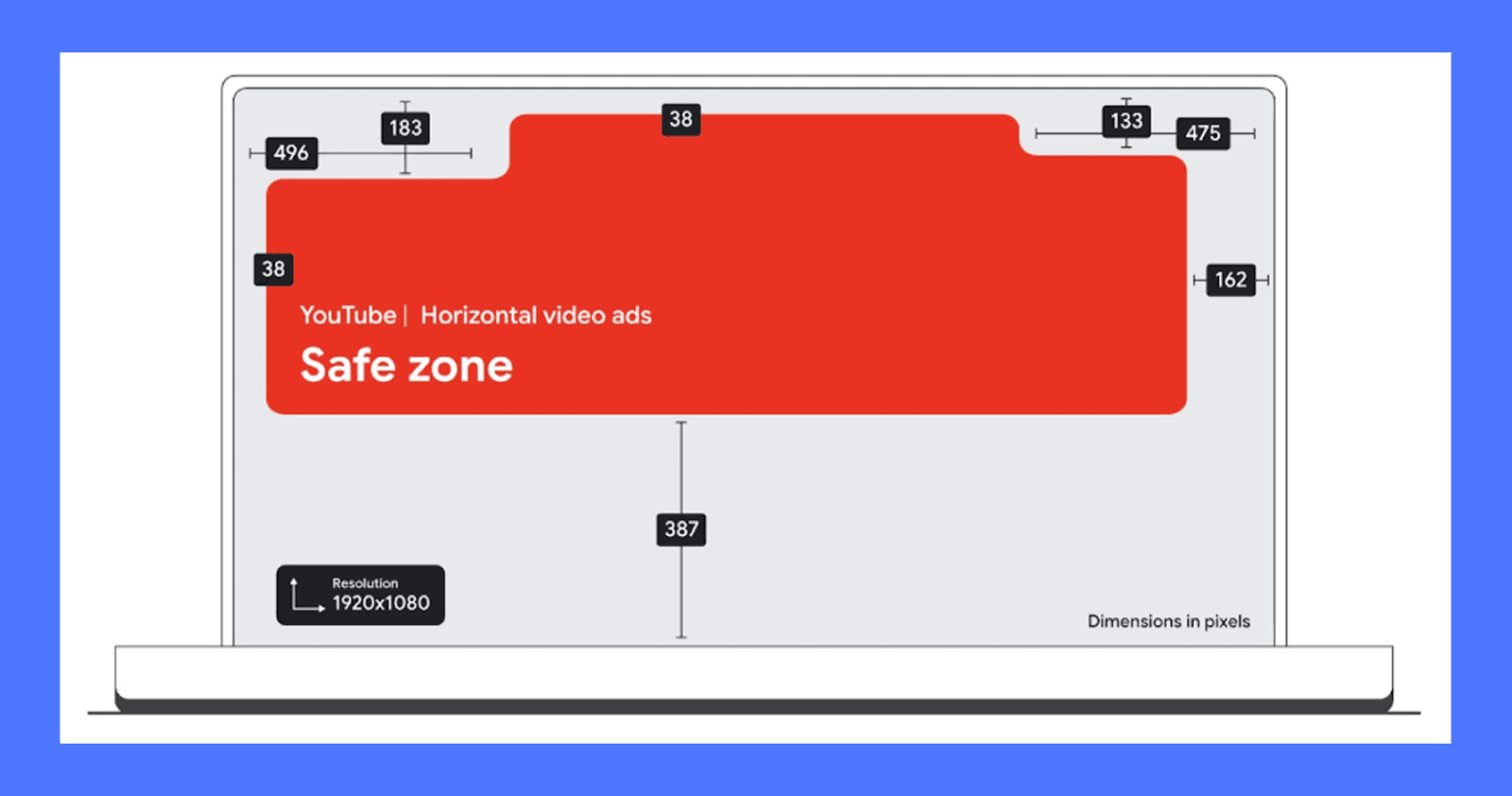
Designing with generous margins ensures your message stays visible across screens without needing multiple edits.
How to Export Video Ads Without Re-Editing Everything
A good rule is to treat vertical video as the base, not the exception. A 9:16 master gives you the most flexibility across Instagram Reels, TikTok, YouTube Shorts, and even vertical YouTube ads. From there, you can safely crop or reframe into 4:5 or 1:1 without losing key visuals.
The bigger mistake is relying on auto-cropping. Platforms will accept a wide range of ratios, but that doesn’t mean they’ll preserve your composition. Text near the edges gets pushed out. Faces get clipped. CTAs end up under UI elements. Exporting “one size fits all” usually creates subtle problems that only show up after the ad is live.
Instead, lock one master export per orientation. Keep text and logos centered, leave extra padding around edges, and avoid baking platform-specific UI assumptions into the creative. This reduces rework, speeds up approvals, and keeps performance consistent when the same concept runs across multiple placements.
Create Winning Video Ads With Airpost
Understanding video ad specs is a necessary step. But once you start running ads at scale, specs become just one part of a much larger workflow.
You’re not only checking dimensions. You’re testing ad hooks, refining copy, adjusting framing for different placements, and reworking ideas that show promise. Doing that repeatedly takes time and coordination, and it gets harder to sustain without either growing a large team or slowing down testing.
Some teams turn to AI tools to increase output, but many of those tools shift the work instead of removing it. Prompting, reviewing, and fixing outputs can add friction rather than reduce it.
Airpost is designed for teams in this phase. It combines AI with experienced creative strategists, so variation, formatting, and platform requirements are handled as part of one system.
Airpost automatically resizes every ad to vertical and square formats, repositions the text, and optimizes safe margins so you never have to worry about specs for each placement. You test more ideas without expanding your team or adding more manual steps.
Book a demo to see how Airpost can create video ads across platforms without added overhead.



