Opus Clip is an AI-powered tool that takes long-form videos and turns them into short, shareable clips for platforms like TikTok, YouTube Shorts, and Instagram Reels. It's built for people who are sitting on hours of video content and want to repurpose it without spending hours editing.
But does the AI actually pick the right moments? Is the output good enough to post without heavy editing? And are the paid plans worth upgrading to?
We looked at Opus Clip's features, tested its pricing tiers, and identified where it works well and where it doesn't. Here's what we found.
What is Opus Clip and Who is it For?
Opus Clip is a web-based video repurposing tool. You upload a long video (or paste a YouTube link), and its AI analyzes the audio, visuals, and dialogue to find the most engaging moments. It then cuts those into short clips, adds animated captions, reframes the video for vertical formats, and gives each clip a "virality score" from 0 to 100.
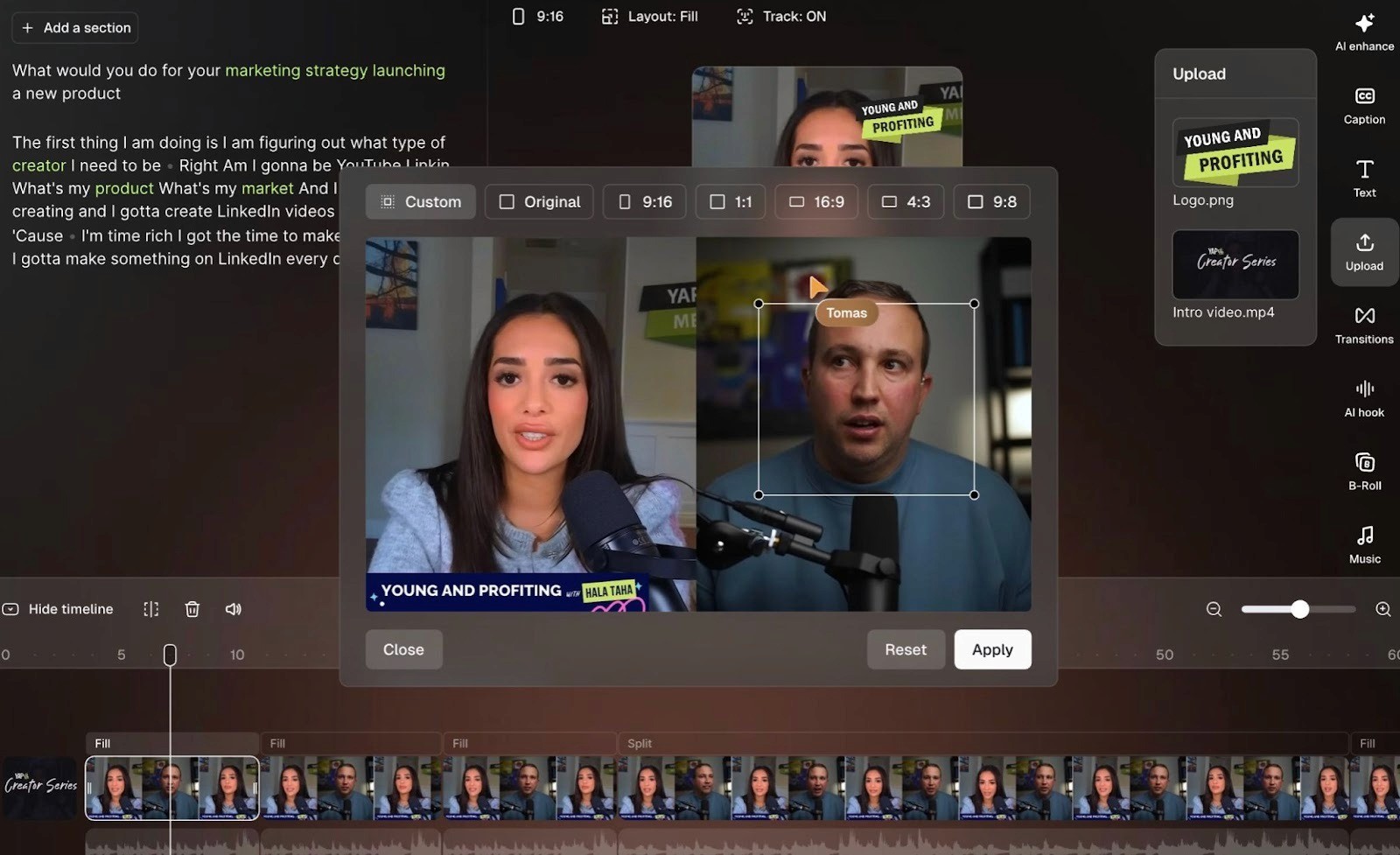
Instead of manually scrubbing through a 45-minute podcast or webinar to find quotable moments, you let the AI do that in a few minutes. It handles the clipping, captioning, reframing, and formatting so the clips are ready to post.
It's mainly used by podcasters, YouTubers, social media managers, agencies, and marketing teams who create long-form content and want to stretch it across short-form platforms. If your workflow involves regularly turning interviews, webinars, streams, or talks into social clips, then Opus Clip is good to have in your toolkit.
Key Features
ClipAnything: Opus Clip's core AI engine. It analyzes spoken words, visual cues, sound, and emotion to identify highlight-worthy moments from your video and turn them into standalone clips.
Virality Score: Each generated clip gets a score from 0 to 100, giving you a rough sense of which clips might perform better on social media. It's a helpful starting point for deciding what to post first.
AI Reframe: Automatically converts landscape videos to vertical (9:16), square (1:1), or keeps them at 16:9. It tracks faces and objects so the framing stays centered.
Animated captions: Auto-generated subtitles with emoji highlights, keyword emphasis, and multi-language transcription support. Caption accuracy is generally strong, especially for English content.
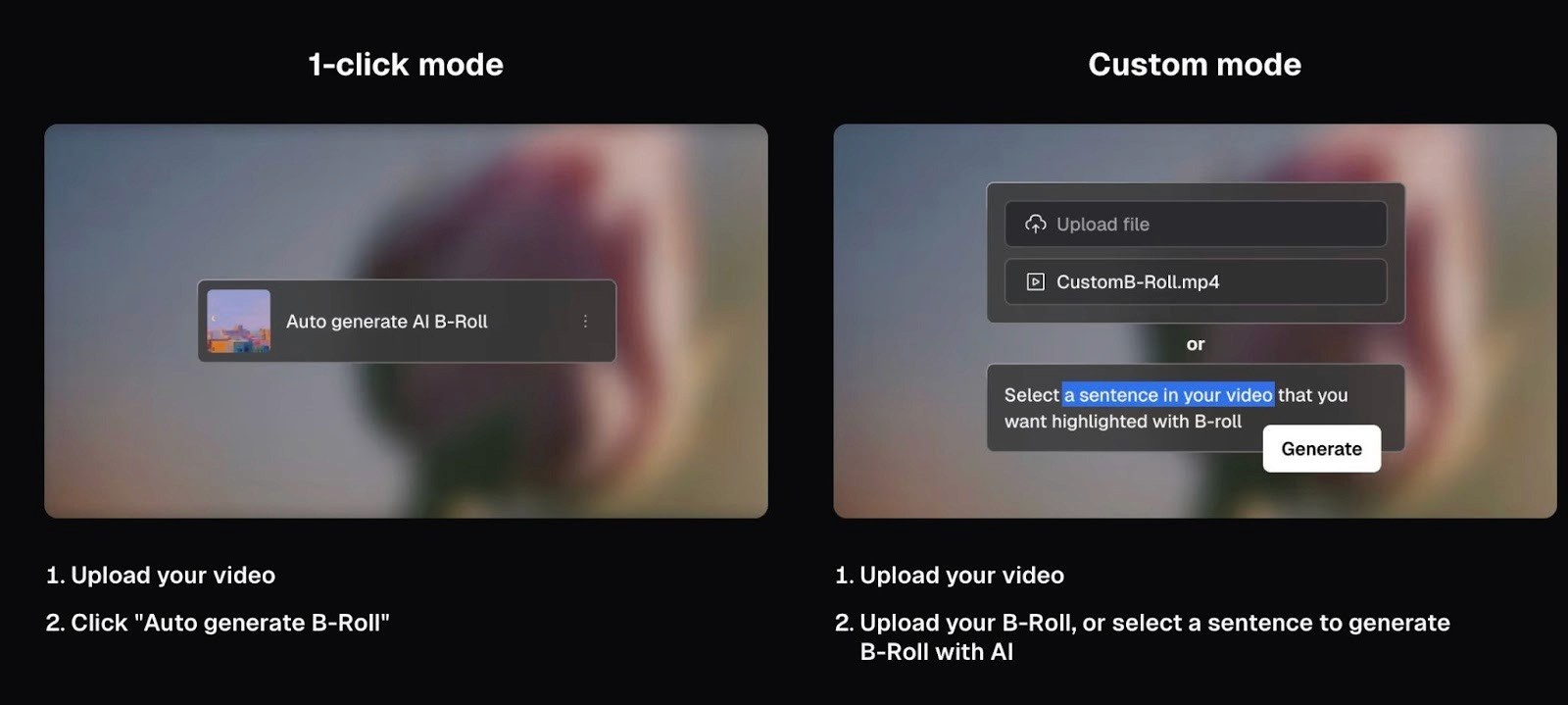
AI B-Roll: The Pro plan lets you generate or pull in B-roll clips automatically, so your shorts aren't just a static talking head the entire time.
Brand templates: Apply your logo, colors, and fonts to keep clips visually consistent across platforms.
Social scheduler: Schedule and post clips directly to YouTube Shorts, TikTok, Instagram Reels, LinkedIn, Facebook, and X from inside the tool.
Editor: A built-in editor for trimming, adding text overlays, music, transitions, and voiceover. Available on Starter and above.
Export to editing software: Pro users can export clips to Adobe Premiere Pro and DaVinci Resolve if they want to do more detailed editing outside the platform.
Filler and silence removal: Automatically cleans up filler words and awkward pauses from your clips.
Opus Clip Pricing: What Each Plan Gets You
Opus Clip has four tiers: Free, Starter, Pro, and Business. The Pro plan offers a 50% discount with annual billing. Starter is only available as a monthly plan.
Like many AI video tools, Opus Clip runs on a credit system. Credits are tied to processing minutes, not finished clip minutes. So if you upload a 30-minute video, that uses 30 credits regardless of how many clips the AI generates from it. Keep that in mind when estimating how far your credits will stretch.
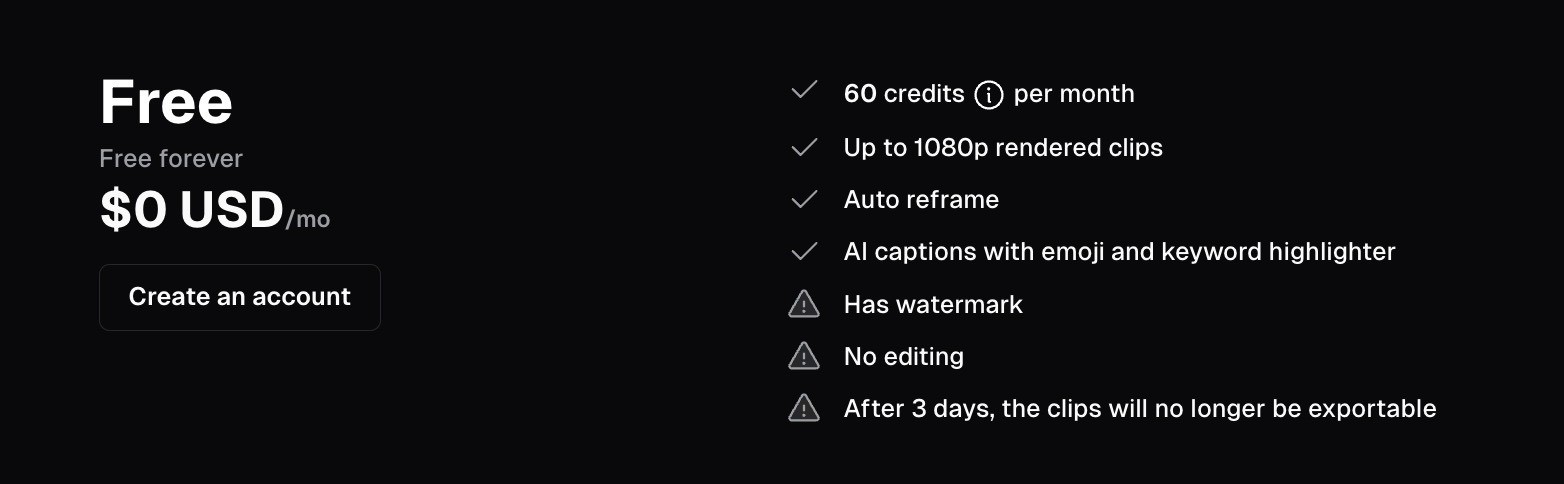
The Free plan gives you 60 credits per month, which is enough to test the tool on a couple of videos. But clips expire after 3 days, there's no editing, and everything comes with a watermark. It's good for a test run, not for actual use.
Starter at $15/month gets you 150 credits, watermark-free exports, basic editing, and the ability to post directly to TikTok, YouTube Shorts, and Instagram. If you're a solo creator posting a few clips a week, this covers the basics.
Pro at $29/month (or $14.50/month billed annually) is where the tool opens up. You get 3,600 credits per year, team workspace, a social media scheduler, multiple aspect ratios, AI B-roll, bulk export, and the ability to export to Premiere Pro or DaVinci Resolve. This is the plan that makes sense for most professional creators and small marketing teams.
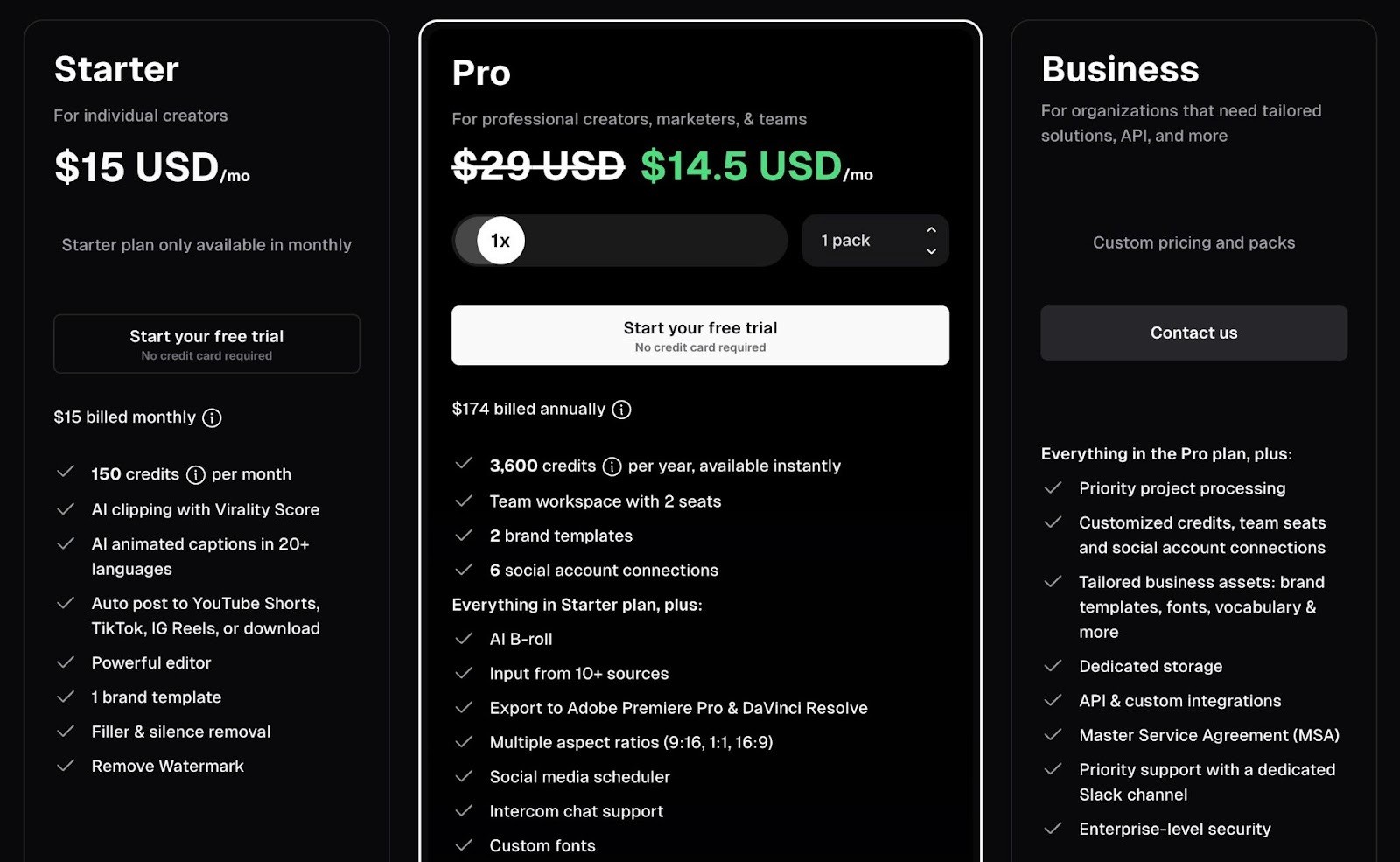
Business is custom-priced and built for larger organizations that need API access, unlimited seats, dedicated support, and enterprise security features like SSO.
Where Opus Clip Falls Short
Opus Clip is great at what it does, but there are some real limitations to keep in mind before you commit.
The AI doesn't always pick the right moments
The virality score and auto-clipping work well for straightforward talking-head content like podcasts and interviews. But if your video has more nuance, like humor, sarcasm, or context-dependent moments, the AI can miss the mark. You'll often end up with clips that start or end at awkward points, or highlight moments that don't land without the surrounding context.
This means you still need to review every clip before posting. It's faster than editing from scratch, but it's not a "set it and forget it" tool.
The built-in editor is limited
Opus Clip's editor handles the basics: trimming, text overlays, music, and captions. But if you need precise timing, layered audio, or more advanced editing, you'll hit the ceiling quickly. Several users report that the editor feels clunky for anything beyond simple adjustments.
The workaround is exporting to Premiere Pro or DaVinci Resolve (available on Pro), but that adds another step to the workflow.
It's a repurposing tool, not a creation tool
This is an important distinction. Opus Clip doesn't create videos from scratch. It takes existing long-form content and cuts it into shorter clips. If you don't already have a library of video content to feed it, the tool won't be very useful. It's not comparable to tools like Fliki or Synthesia that generate videos from text.
B-Roll quality is inconsistent
The AI B-roll feature is a nice idea, but the results can be hit or miss. Sometimes the generated or suggested B-roll clips are relevant and add to the story. Other times, they feel generic or slightly off-topic. It's worth reviewing these closely rather than trusting the AI's choices by default.
Not built for ad creative
Opus Clip is designed for organic social content, not paid advertising. There's no way to build ad-specific formats, test different hooks or angles, or track ad performance. If you're creating content for paid campaigns on Meta or TikTok, you'll need a different tool.
5 Opus Clip Alternatives
If Opus Clip isn't the right fit, here are some other AI-video tools worth looking at.
1. Descript
Descript lets you edit video and audio by editing text. It transcribes your content, and you cut, rearrange, or delete by editing the transcript. It also includes screen recording, AI voice cloning, and filler word removal. It's a more full-featured editor than Opus Clip, but it's not specifically built for auto-clipping. Paid plans start at $24/month.
2. Vizard.ai
Vizard is a direct competitor to Opus Clip. It auto-clips long videos into shorts and supports multi-language transcription and captions. It tends to offer more credits at a lower price point, with 600 minutes on its starter plan. If volume is a priority, it's worth comparing. Paid plans start at around $14.50/month.
3. Framedrop
Framedrop is built more for gaming and livestream content. It detects highlights from streams and gameplay footage in real time, which is something Opus Clip doesn't do as well. Its free plan includes full editing tools, which makes it attractive for creators on a budget. Paid plans start at $5/month.
4. Pictory
Pictory works differently. Instead of clipping from existing video, it turns blog posts, scripts, and text into video using stock footage and AI voiceover. It's better for creating new content than repurposing existing footage. If you need to produce videos from written content rather than long-form recordings, Pictory is a better fit. Paid plans start at $14/month.
5. Spikes Studio
Spikes Studio is another AI clipping tool similar to Opus Clip. It supports YouTube, Twitch, and Zoom imports and offers smart highlight detection with captions. It's a lighter tool with a simpler interface, which some users prefer. Paid plans start at $9/month.
Choose Airpost to Create Winning Ads at Scale
The tools above are great for organic content, but if your goal is paid advertising, they're not built for that workflow. Most of them clip or create general video content. None of them helps you systematically build, test, and scale ad creatives.
If you want to create winning ads, then Airpost is your best option.
It's a hybrid platform that combines AI-powered ad creation with expert creative strategists who manage the process for you. You don't clip videos yourself or prompt an AI to generate ads. Airpost delivers done-for-you video ads every week, built around a living brief that evolves with your performance data.
Airpost uses a proprietary ad taxonomy that categorizes every creative by format, hook type, angle, and performance pattern. Each new batch of ads is informed by what's actually working across your campaigns.
Here's what you get with Airpost:
10 to 30 new video ads delivered per week
Expert creative strategists managing your account
A living brief that updates as your campaign performance shifts
24/7 performance monitoring that triggers new variations when an ad starts winning
Access to 300,000+ real footage clips alongside AI-generated assets
Automatic resizing to vertical and square formats with optimized safe margins
Built-in brand safety, compliance, and a Disclaimers feature to keep your ads clean
Book a demo to see how Airpost works if you're spending serious budget on Meta or TikTok and need a system that learns, adapts, and keeps delivering diverse creatives at volume.



