Synthesia is the AI video tool most business teams hear about first. It has a 4.7/5 rating on G2 from 2,000+ reviews, and over 50,000 customers. But popularity alone isn't a good enough reason to pick a tool. You need to know if it actually fits your goals, and if it doesn't, what the right alternative is and why.
This post breaks down what Synthesia is, how the 2026 pricing works after the recent price drop, the key features, and where the tool fits (and doesn't fit). We'll also cover whether it works for paid social ads, and what to use instead if your real bottleneck is ad creative at scale.
What is Synthesia AI?
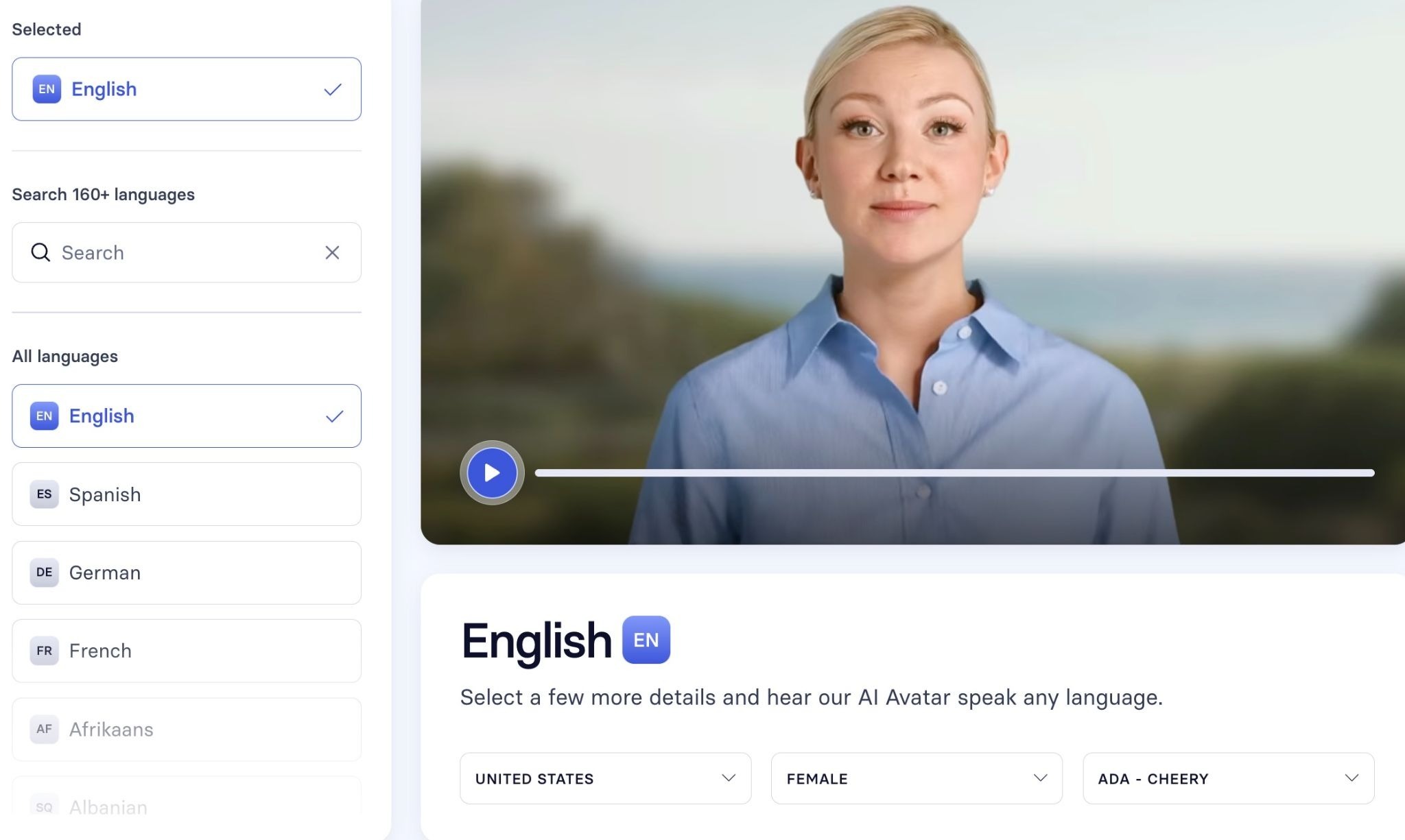
Synthesia is an AI video tool that lets you make studio-quality videos without a camera, microphone, or actor. You type a script, pick an AI avatar, and the tool turns your words into a video where the avatar speaks your script in 160+ languages. It's built for businesses that need a lot of videos, like training, sales, and marketing teams.
Think of it as a replacement for the usual video shoot. Instead of booking a studio, hiring a presenter, and editing footage, you write text and get a finished video in minutes. The company says teams save up to 90% of the time and budget they'd usually spend on video production.
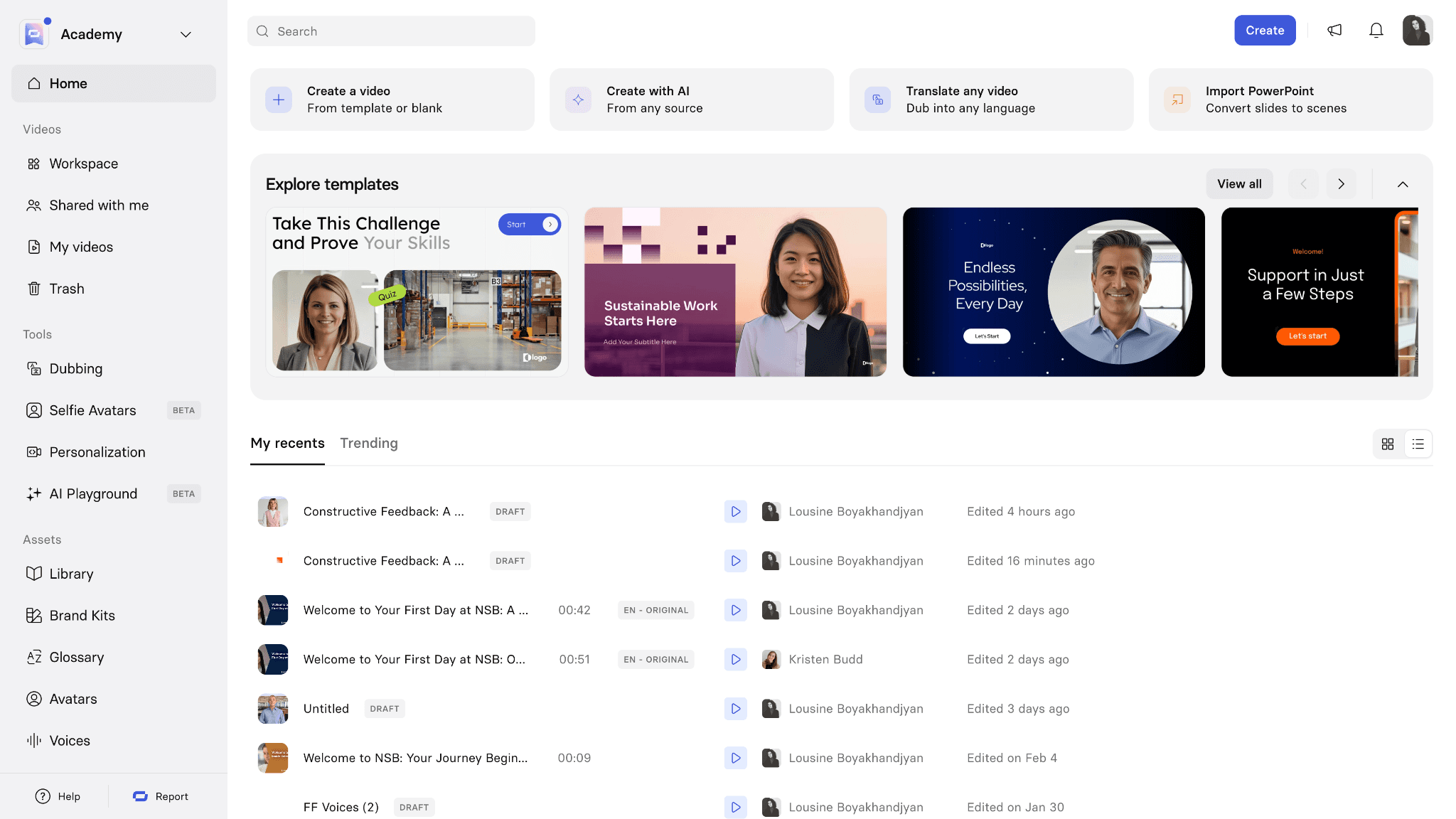
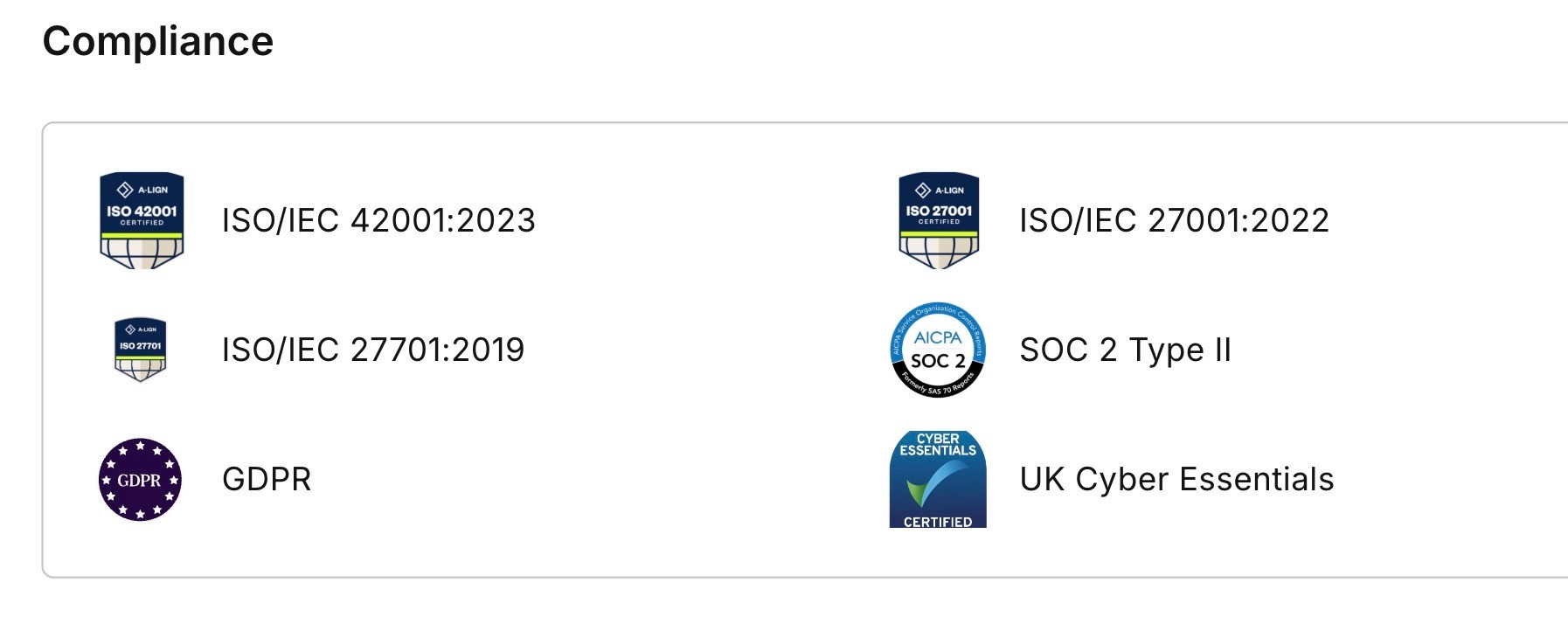
The tool also covers the full video workflow in one place. You can create the video, translate it, get team feedback, publish it, and track how it performs. It's also approved for use at companies with strict legal and security needs. Synthesia is SOC 2, GDPR, and ISO 42001 compliant, supports SSO, and moderates every video to prevent misuse. So even regulated industries can use it without IT pushback.
What are the key features of Synthesia?
It has features for both video makers and large teams that need brand control, security, and LMS support. Here are the main ones:
Express-2 Avatars: AI avatars that gesture like real presenters. They wave, point, and clap based on your script, so your videos feel more natural and not robotic.
Personal Avatars: You can create a digital version of yourself that speaks 30+ languages. It saves you from re-recording the same video for different markets.
AI Playground: It gives you access to top AI models like Sora 2, Veo 3.1, FLUX.2, and Nano Banana Pro in one place. You don't need to pay for each tool separately.
Voice Cloning: You can record your voice once and pair it with your avatar. Your videos sound like you, even when you didn't record them.
AI Screen Recorder: It transcribes your voiceover, cuts out pauses, and lets you fix mistakes by editing text. Helpful when you want clean tutorials without re-recording.
AI Video Assistant: You can drop in a deck, PDF, or website link and it turns the content into a video. It saves you from writing scripts from scratch.
1-Click Translation: You can translate any video into 80+ languages with one click. Useful when you need to reach global teams or customers fast.
AI Dubbing: It keeps the original speaker's voice and adds lip-sync in the new language. The video still feels authentic, not dubbed over.
Brand Kits: Your colors, fonts, and logos get applied to every video automatically. No need to manually style each one.
Interactivity: You can add quizzes, CTAs, and branching paths inside the video. It helps you turn passive videos into something viewers actually engage with.
Version Control: You can update a video once and it refreshes everywhere it's embedded. No more outdated content sitting on old pages.
SCORM Export: You can export videos as SCORM files that plug straight into your LMS. It saves your L&D team a lot of manual work.
How much does Synthesia cost?
Synthesia has 4 plans that start free and go up to custom enterprise pricing. It is also affordable to try, but the features that make it useful for big teams (translation, brand kits, SCORM, SSO) sit behind the Enterprise tier.
Plan | Price | Video Limit | Best for |
Basic | Free | 10 min/month | Testing it out |
Starter | $18/mo (yearly) or $29/mo | 120 min/year | Solo creators, freelancers |
Creator | $64/mo (yearly) or $89/mo | 360 min/year | Small teams, content creators |
Enterprise | Custom | Unlimited | Large companies, L&D teams |
Here's a quick overview of what you get in each plan:
Basic (Free): You get 10 minutes of video a month and 9 avatars. Good to test the product, but the Synthesia logo stays on your videos.
Starter ($18/mo): You can download videos, remove the logo, and use 125+ avatars. No personal avatars or API access yet.
Creator ($64/mo): This is their "most popular" plan. You get 5 personal avatars, API access, interactive videos, and 180+ avatars. Best value if you make videos often.
Enterprise (Custom): You get unlimited videos, 1-Click Translation, SCORM export, SSO, brand kits, and a dedicated success manager. Priced based on usage.
Things to watch out for
The advertised $18 and $64 prices are only if you pay yearly. If you go monthly, it jumps to $29 and $89, so the savings come from a longer commitment. Also keep in mind that unused video minutes do not roll over, so the annual quota resets if you don't use it.
A few features cost extra or sit behind higher tiers:
Studio Avatars (custom filmed avatars) cost an extra $1,000/year on every paid plan.
AI Dubbing is included in Starter and Creator usage, but it's a paid add-on on Enterprise.
1-Click Translation and SCORM export are Enterprise-only, so the lower plans won't work if you need either.
So while Synthesia looks cheap at the entry level, the cost can climb fast once you need translation, custom avatars, or LMS support.
Can you use Synthesia for social media ads?
Technically you can, but it's not the best tool for it. Synthesia is built mainly for business videos like training, sales pitches, and internal comms, not punchy social ads where real faces and quick hooks win.
AI avatars can feel inauthentic. They're realistic, but most viewers can tell it's AI. On platforms like Instagram and TikTok where authenticity drives clicks, that hurts performance. It's not built for fast cuts or trends. Synthesia leans toward explainer-style videos. It doesn't have the quick edits, transitions, or sound effects that social ads usually rely on. Even the Creator plan ($64/mo) gives you 360 minutes a year. For ad testing where you make 20+ variants, you'll burn through that fast.
What Synthesia does well
Synthesia stands out in a few clear areas, mainly around video quality, language support, and ease of use. Here's where the tool genuinely earns its spot as the #1 AI video platform for business:
Multi-language support
You can create or translate a video into 160+ languages with one click. The lip-sync is good enough that the video doesn't feel dubbed. If you have a global audience, this saves you weeks of localization work and a lot of money on voice actors.
Enterprise-ready security
Synthesia is SOC 2, GDPR, and ISO 42001 compliant, and supports SSO. That's why 90% of Fortune 100 companies use it. If your IT or legal team is strict about AI tools, Synthesia clears the bar that other tools might fail inter terms of security.
Easy for non-editors
You don't need video editing skills to use it. 90% of users publish their first video without a tutorial. You type a script, pick an avatar, and you're done. It's a good fit for teams where everyone needs to make videos, not just a video specialist.
All-in-one workflow
You create, translate, collaborate, publish, and track your videos in one place. No need for a separate translator, editor, or hosting tool. For L&D and internal comms teams, this cuts down the number of tools you pay for and manage.
What Synthesia doesn't do well
For all its strengths, Synthesia has clear gaps once you push it beyond its core use case. Here's where the tool starts to fall short, especially if your goal is paid ads or scale:
Not built for social ads
AI avatars look polished but not raw. On platforms like TikTok and Instagram where authenticity drives clicks, most viewers can tell it's AI. The format works for explainers, not the punchy, native-feel content that performs on paid social.
Limited creative flexibility
Synthesia leans toward talking-head videos. You don't get fast cuts, dynamic transitions, sound design, or the kind of edits ad creative needs. If your goal is to test 20 hook variations or build TikTok-style ads, the tool will hold you back.
Best features locked behind Enterprise
The features that make Synthesia useful at scale (1-Click Translation, SCORM export, SSO, Brand Kits) all sit behind Enterprise pricing. So the $18 and $64 plans look cheap, but you'll need a custom quote to unlock what your team actually wants.
Video minutes don't roll over
You get 120 or 360 minutes a year on paid plans, and unused time resets. If you're testing or have a slow month, you lose that budget. For teams with bursty video needs, this makes the per-video cost feel higher than it looks on the pricing page.
Use Airpost to create winning ads
Airpost is a hybrid AI ad creative platform. It's a proprietary AI engine run by expert creative strategists. You don't log in and prompt it yourself. Instead, you upload your brand kit, past ads, product data, and footage. Airpost's team uses the AI engine to produce 10 to 50 new ad concepts a week, then tests new hooks, personas, and angles based on what's working in your account.
Synthesia gives you the software to make a video. But Airpost gives you the strategy, the scripts, the production, and the testing loop that turns videos into ads that actually convert. It's used by performance teams at companies like DoorDash and Cloaked to generate winning ads for social media.
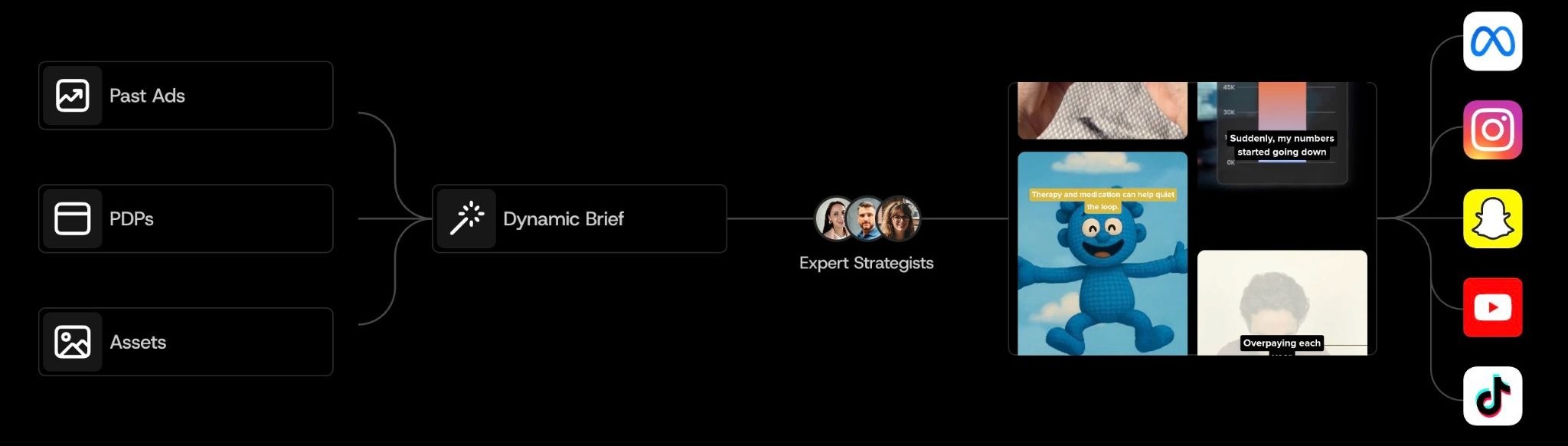
Airpost vs Synthesia:
Synthesia | Airpost | |
What it is | A tool you use | A team that runs your creative |
Best for | Training, demos, internal videos | Paid social ads at scale |
Output | You make 1 video at a time | 10 to 50 ad concepts a week |
Strategy | You bring your own | Done for you |
Best fit | Solo creators, L&D teams | Performance marketing teams |
Here's what you actually get with Airpost:
10 to 50 new ad concepts a week, made for you without needing to brief anyone.
A team of real strategists who manage the creative, with backgrounds at top performance shops like TubeScience and Narrative.
A proprietary AI engine that mixes your brand assets with stock and AI-generated footage.
Living briefs where you update your product or angle and your ads update with it.
Native integrations with Google Drive, Dropbox, and your DAM so assets pull in without manual work.
Google Sheets sync so your team can approve and upload from a tool they already use.
Creative diversity so new personas, hooks, and value props are tested against what's already working in your account.
Low cost per ad so you can test freely instead of betting on one concept.
No prompting required. You don't log in to write prompts, the team handles it.
If you're running paid social as a real growth channel, book a demo with Airpost.



